Your privacy documents are
first-class. Nobody cares.
Now what?
Welcome to my sandbox. This is where I test how strategic UX design can turn privacy compliance into something employees follow, AI systems use, and customers trust.

IT lawyer & UX designer
Nadine Rinderknecht
MLaw, LL.M. TMT (Queen Mary) • Zurich
Hello, I'm Nadine. If I'm doing something, it must be useful. Even privacy compliance.
PROBLEM
Drafting documents for regulators
Privacy compliance is written for regulators who'll probably never read it. The people who have to live with it get forgotten.
-
Documents nobody understands miss the law's purpose, creating legal risks themselves
-
They waste the legal work you've already paid for
-
They lose out on additional opportunities like user trust and market differentiation
You know how that looks in practice...
Employees skip memos and disregard the law
Privacy review delays the launch
AI uses the wrong clause
Customers see legalese and click away
SOLUTION
Designing impact with legal precision
I ran into these problems myself. My blog Blankpage needed a privacy notice. My first version was legally sound. And useless. So I redesigned it into an engaging blog post and added a Privacy Center in the footer.
My own website became the sandbox where I test every idea before writing about it. This eventually led to the Privacy Chameleon Framework. It shows how UX design can reinforce the law and create new opportunities.
Legal or design? Both!
Privacy Chameleon Framework combines legal and UX design. Compliance adapts to users. While remaining legally defensible. More details
Legal alone makes documents defensible, but it won't make anyone read it
Design alone makes documents friendlier, but it can't tell you if simplifying a clause creates legal exposure

I tested everything on my own website first.
Click on a project below and you'll get the full story, including my mistakes.


Let's bring the first project to life.
PROJECT 1
CHAMELEON POINTS

Chameleon Points measure depth of adaptation
1: clearer documents│2: AI-ready compliance│3: privacy as brand experience
Privacy Center
Privacy essentials living in the footer of your website.
KEY INSIGHTS

PROBLEM
Users lose trust with privacy notices written in legalese
Key information feels hidden and is hard to find. Yet users want to make informed decisions.

SOLUTION
Create an overview that users actually engage with
Overview with practical guidance directly in the footer. The full privacy notice is just a click away.
IMPACT

Build trust through transparency and user-friendliness
Reduce support questions and use privacy as a differentiator while others hide behind legalese.
UX DESIGN AMPLIFIES LAW

No overwhelmed users
Visual hierarchy and interactive disclosure give users key details
Familiar and minimalistic icons
Icons users already know from big tech rather than Swiss Privacy Icons
For the checkbox lovers
Legal text inside main interface
Disclaimer inside the Privacy Center using plain language
LEGAL DESIGN CHALLENGES
Aha! moments 🌿


Ready to rethink a privacy notice?
PROJECT 2
CHAMELEON POINTS
Privacy Notice
Empowering users with a notice that doesn't put them to sleep.
KEY INSIGHTS
PROBLEM
Users don't understand privacy notices and feel overwhelmed
Privacy notices are dense, technical, and written for compliance rather than comprehension.
SOLUTION
A blog post format with storytelling elements
Café storytelling and café theme keep users informed and engaged rather than drowsy.
IMPACT
Compliance becomes a trust and business advantage
Privacy information becomes understandable and memorable enough that users trust it.
UX DESIGN AMPLIFIES LAW
User empowerment
Conversational tone, step-by-step format, and actionable privacy tips
Two-layer structure
Storytelling why privacy matters. And legal details how data is used
Easy-to-understand café theme
Café metaphors and icons such as "takeaway bag" for portability right
LEGAL DESIGN CHALLENGES
Aha! moments 🌿
BONUS • BEHIND THE SCENES
The world's most boring blog post got 65x more visitors!
My old privacy notice got 3 unique visitors in 5 years (one of them might've been me checking if the link still worked). The new blog post version got 40 in its first year, roughly 65x more per year. What I learned? Most of that jump is probably placement. A blog post on the homepage gets found way easier than a link in the footer. So the number doesn't prove people understood or trusted the notice more. What it proves is that where you publish privacy information decides whether it's ever seen at all. And being seen is the starting point for everything else.
Now let's integrate all the insights into a framework to spot new opportunities.
Privacy Chameleon Framework
Built on law. Designed for impact.
Find out what kind of UX design best supports your compliance. This framework takes your privacy beyond a checkbox exercise. Done right, compliance adapted to your users creates transparency and trust, reducing legal risk and opening the door to competitive advantage.
The chameleons show depth of adaptation: one makes your documents clear, two makes them AI-ready, three turns privacy into part of your brand. Start small. One chameleon is a perfectly good place to begin.

Privacy Clarity
Privacy for employees
Privacy is redesigned to be followed by your employees.
You've done everything right on paper. Now you want it to change behavior inside your organization.
WHAT UX PRIVACY ENABLES

Policies are read,
understood, and actually implemented.
Employees find answers themselves, without coming back with the same questions.
Contracts and approvals move faster because the language is clearer.
WHAT TO BUILD

Simplification of existing documents using plain language and visual aids.

FAQ documents on privacy issues that employees repeatedly ask you.

One-pagers What does this mean for me? with recurring tasks and actionable tips.
...and more, tailored to how your employees work best.

Privacy Intelligence
Privacy for AI
Privacy is redesigned so your AI can act on it reliably.
You've built the legal foundation. Now you want AI to find the right answer at the right time.
WHAT UX PRIVACY ENABLES
AI systems retrieve the right obligation from the right document.
Compliance gaps surface automatically across your document library.
Privacy infrastructure scales with your business without scaling legal headcount.
WHAT TO BUILD

Metadata layers so AI knows what it's reading before clause one.

AI-readable obligation register (who, what, deadline, source clause).

Consistent clause identifiers across your document
library.
...and more, tailored to your AI deployment and document stack.

Both humans and AI benefit from Privacy Clarity. This tier focuses on what AI needs additionally.
Privacy Experience
Privacy for customers
Privacy is redesigned to make customers choose you.
You've made your product user-friendly. Now you want to bring privacy to the same standard.
WHAT UX PRIVACY ENABLES
Customers prefer you over a competitor because your UX privacy builds trust.
Privacy is built into your product from day one, so it doesn't delay a launch.
Customers who understand data practices opt in more and stay longer.
WHAT TO BUILD

Privacy documents based on your brand identity and communication standards.

In-product privacy details that answer questions before they arise.

Privacy onboarding that builds trust at the moment it matters most.
...and more, tailored to your customers and brand identity.

Sample projects to discover:
ADDITIONAL OPPORTUNITIES

Compliance audit
Designing for clarity often surfaces missing disclosures and inconsistencies between what's communicated and what's practiced. Before a regulator, incident, or complaint does it for you.
Organizational buy-in
Privacy needs a seat at the table. If that influence isn't there, part of the work is building the internal case for it. The combination of legal and UX expertise makes the difference here: legal justifies why privacy matters, design shows how it creates value.
FAQ
This framework is an ongoing project, currently in version 2.0. It will continuously be adapted to market needs.
About me

Turning privacy into a business asset means rethinking what the law permits, not just what it requires, and implementing that with UX design
MY STORY
My blog Blankpage needed a new privacy notice. It already had one, legally correct and useless. That bothered me, because I don't build things that aren't useful. I also wanted to sharpen my UX design skills. So the blog became my sandbox. Two projects grew out of it: a privacy notice that welcomes readers into a café, and a Privacy Center in the website footer that shows privacy details at a glance. Since I like to systematize my knowledge, I collected everything in one place, added additional opportunities in UX privacy, and called it the “Privacy Chameleon Framework”.
LIFELONG LEARNING
-
UX Design Professional Certificate
Google (approx. 200 learning hours)
-
Certificate in Cyberpsychology
Dún Laoghaire Institute of Art, Design and Technology
(10 ECTS credits)
-
LL.M. Technology, Media and Telecommunications Law
Queen Mary University of London
-
CAS IoT and Digital Ecosystems
Lucerne University of Applied Sciences and Arts
(15 ECTS credits)
-
Master of Law
University of Zurich, focus on IT law
WORK EXPERIENCE

-
Queen Mary University of London
Jan 2023 – Sept 2023
Research assistant to Prof. Christopher Millard
-
CORE Attorneys
July 2022 – Sept 2022
Intern • competition law
-
LAUX LAWYERS
Feb 2021 – July 2022
Legal trainee • IT law
-
Stump und Partner Patentanwälte
Oct 2018 – Nov 2019
Assistant • patent law
SELECTED PUBLICATIONS
-
The double erosion of data protection law, WEKA-NL Datenschutz, 01.2022 (in German)
-
Cloud computing in the vortex of cantonal data protection laws, WEKA-NL Datenschutz, 08.2021 (in German)
SELECTED BLOG POSTS
-
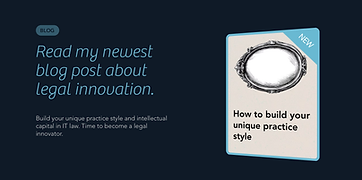
How to build your unique practice style in IT law (Part 1), Blankpage, 26.04.2026
-
How to develop "IT-shaped thinking" as a lawyer, Blankpage, 18.05.2025
MY BLOG "BLANKPAGE"
I also run www.blankpage.world, a blog about legal innovation. Step by step tips on building your own practice style and intellectual capital in IT law.
Move your mouse over the Blankpage logo below to create a wormhole straight to the blog.
Our next project... Exchange ideas!
Curious about one of the projects?
Questions about the Privacy Chameleon Framework?
Spotted a flaw in my reasoning?

